Ships Between 4 to 7 Days
Order before 15:00 to expedite shipping
Secure Payments
Secured by OZOW and Paystack
Free Shipping for orders above R3000
We will ship your order for free to anywhere in SA - Our Gift to you!
Order before 15:00 to expedite shipping
Secured by OZOW and Paystack
We will ship your order for free to anywhere in SA - Our Gift to you!

When optimizing your A329S dash cam, one of the most frequently discussed features is 60fps recording. It delivers smoother footage and better motion clarity—but it doesn’t work in every configuration.
This guide explains exactly when 60fps is supported, and how it interacts with HDR settings and channel configurations, so you can get the best performance for your driving needs.
On the A329S, 60fps and HDR cannot be used at the same time.
Because both features require significant processing power, enabling one will automatically disable the other.
To balance smoothness and low-light performance, the A329S offers an HDR AUTO mode.
This allows you to schedule HDR based on time:
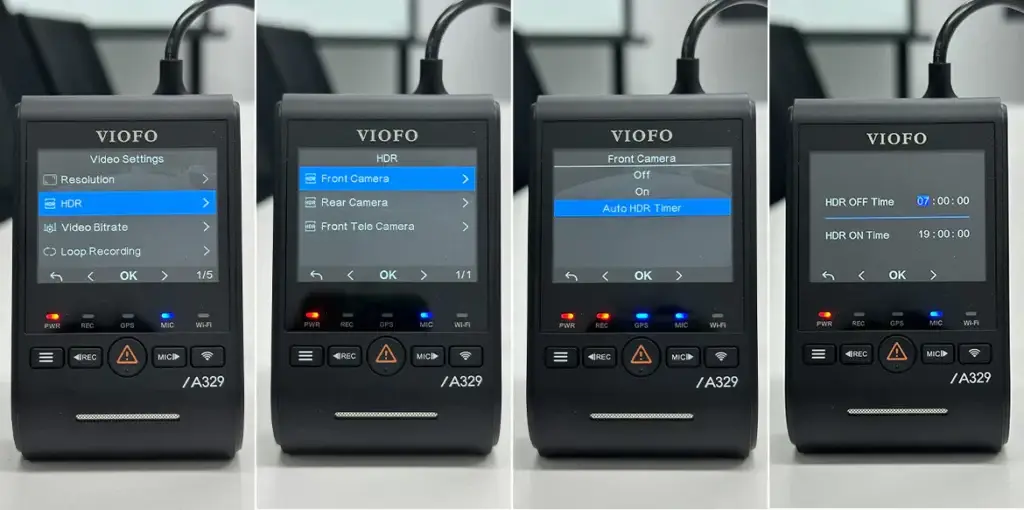
Example:
If you enable 60fps and set Auto HDR Timer from 7:00 PM to 7:00 AM:
This ensures optimal performance without manual switching.
Another important factor affecting 60fps is how many cameras are running.
When two cameras are active:
The system can support 60fps recording.
When a third camera is enabled:
The system switches to 3-channel mode, and 60fps will be disabled.
The A329S gives you full control over the third channel:
You can manually turn it ON or OFF
Or set it Only On while Driving or Only On while Parking
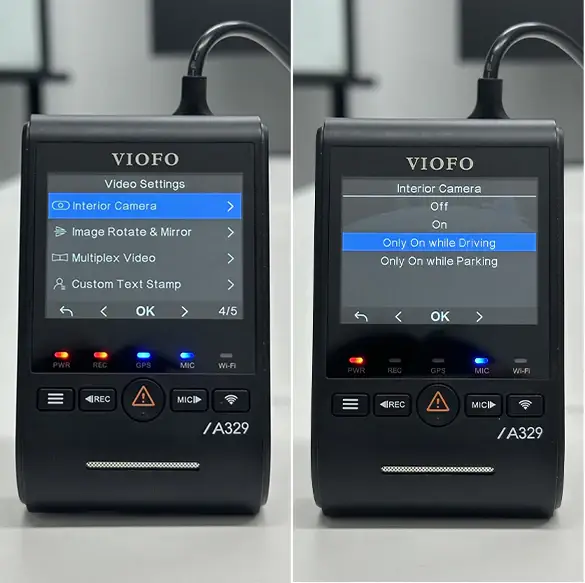
Example (using a cabin camera):
If you enable 60fps and set the third camera Only On while Parking:
Cabin camera OFF → System runs in 2CH → 60fps enabled
Cabin camera ON → System switches to 3CH → 60fps disabled
This setup allows you to keep smoother 60fps recording while driving, while still enabling full interior coverage during parking mode.
In short, 60fps on the A329S is available when HDR is off and the camera is running in 2-channel mode. You can always adjust there settings based on your driving needs, so it works the way you want.